
..webp)


.webp)

Build Webflow sites you’re proud to ship

Like thousands of developers, you will love using Client-First
Client-First help us build more efficiently as Webflow developers
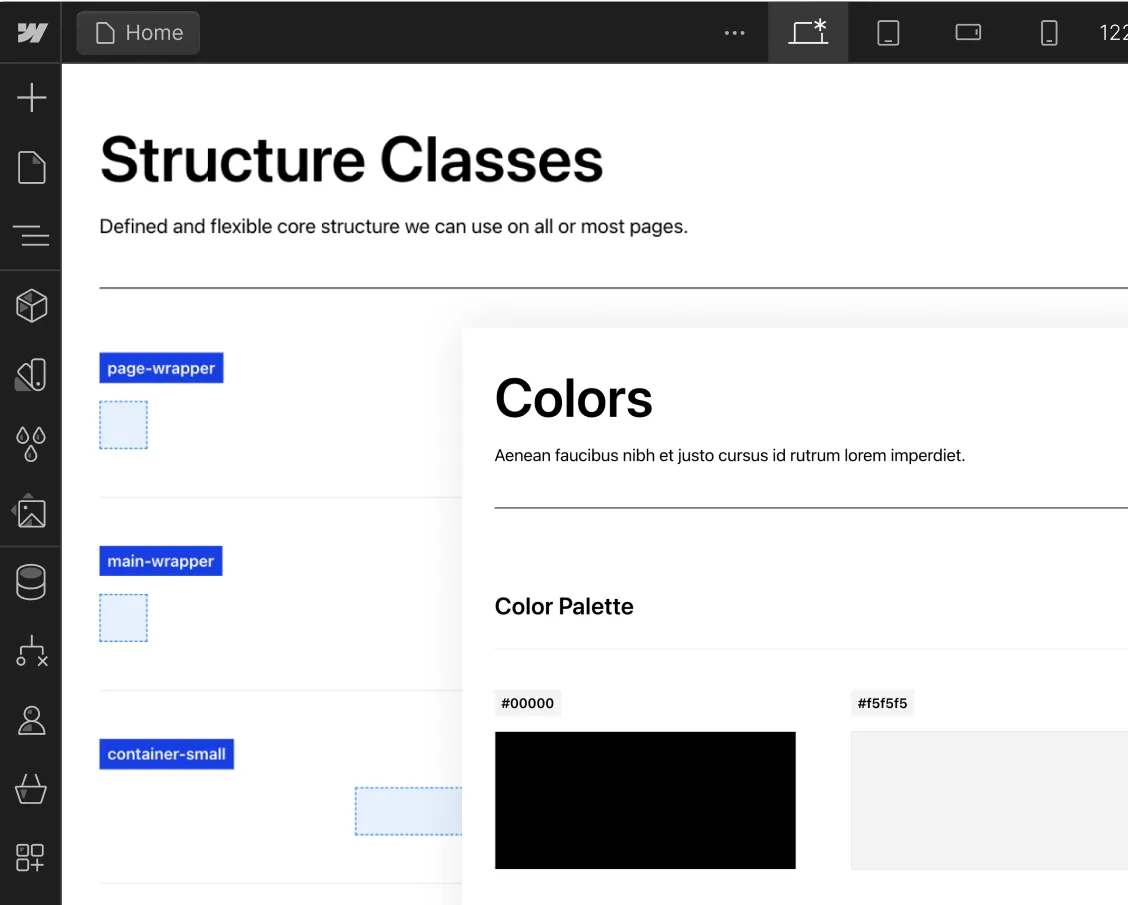
Easy to update Style Guide
Create a project organization system to work faster with less effort.
Know how to name your classes
Create clear and specific names for classes.

Folders view of the structures
Folders help us group, search for, and access elements in our project.

Flexible spacing system
Make intelligent spacing decisions inside Client-First.

Unify a build strategy as a team
Creating a project that allows for scalability

New color system using variables
Explore the power of color variables in Webflow for consistency, global changes, and enhanced project organization

Deep Documentation
The most important topics of Client-First.
Intro to Client-First with an overview of the essential principles.
Strategy for how we identify, use, and manage classes inside Webflow as a platform.
Explanation of rem units and approved rem values in Client-First.
Build and maintain a unified typography style system across the project.
Make intelligent spacing decisions inside Client-First.
- Support Finsweet's free products if they have been helpful to you in any way.
- Your support will help us make our free products even better.
- Feel free to subscribe for a month and cancel afterward if you'd like to help just once.



Learn with Live Builds and our Clonables
Find live builds and Clonables of Client-First.


Join us for a live build in Webflow with Joe Krug. On today's episode, Joe will build the hero section of Webflow's homepage. Be sure to tune in and ask questions in real time!
.jpeg)
The Discord homepage created with Client-first in Webflow.
.jpeg)
The Outline homepage created with Client-first in Webflow.


Clean and fully customizable template built using the Client-first system for Webflow. It features 10 Static and 1 CMS Pages and can be used for all types of businesses.

Clean and fully customizable template built using the Client-first system for Webflow. It features 6 Static pages and is ideal for a personal portfolio website.

A custom designed light wireframe UI kit, built using the Client-first system for Webflow. There are total of 56 components you can start building with.

.webp)



The community and Client-First
Here's what the Webflow community is saying

I have used webflow for a long time and nothing has sped up my development process as much as client-first. Simple straightforward and very adaptable. Also instrumental in landing my first agency freelance gig. Thanks @thatsfinsweet

Spent over 6 hours renaming and reorganizing all my classes in a previous project according to @thatsfinsweet's Client-first Style System. Totally worth it, everything is so organized now

"Client-first is like the foundations of a modern super energy efficient house. It does all the heavy (and tedious!) lifting so you can focus all your creative energy on making the bricks & mortar feel like a home."

A gold standard. When I started Webflow, I was confused to structure my builds.
With Client-First, I am now able to confidently structure, name my classes and build the sites with ease.
Thank you @thatsfinsweet for the gift to the Webflow community.

Update — I think I'm going all in on Client First, build on first site so far was a breeze, didn't slow me down at all, quite the opposite. F*n yeah @thatsfinsweet!

Thanks @thatsfinsweet @joekrug for Client-first. This changes my BEM approach of developing into a better way of working with Webflow. Simple and accessible for anyone.

To be honest my work flow is very close to what @thatsfinsweet do for client first. They have made there system truly global to all devs and clients.

Client-First should be a mandatory requirement for Webflow projects!

The Client-First system is versatile, scalable, and makes class naming (the former bane of my existence) a breeze. It’s easily saved me 60+ hours of dev time and simplifies life for my clients too. Can’t thank @thatsfinsweet enough!


benefits